Tips for Spotting a Fraudulent Email
Personal Information Request
Provident will never ask you to respond to an email with any personal information. This includes your Social Security number (SSN) or your ATM or 24 Hour Access Plus Direct Talk Personal Identification Number (PIN) numbers
Threat of closing an account if information is not provided
This type of email informs you that your account will be closed if you fail to "authenticate" or verify your personal information. Provident will never ask you to confirm information in this manner.
Security or system emails.
This type of email indicates that the bank needs you to confirm important information. The email will ask you to update your information online. Provident will never ask you to confirm information in this manner.
An offer that sounds "too good to be true."
This email may ask that you complete a short survey in order to receive money credited to your account. It will ask for your account(s) and bank routing number(s) in order to complete the deposit to your account. Provident will never ask for your information in this manner.
Misspellings and/or grammatical errors.
Emails containing these issues are often an indicator of attempted fraud. Watch for typos, grammatical errors, awkward wording, and poor design.
Unusual URLs.
Many web pages and emails will display the destination URL of the link when you hover over the link with your cursor. (Please do not click the link) A URL formatted provident.suspicious.com will take you to a site that is not a part of the Provident web site even though Provident is contained within the URL.
Please, do not reply to any of these types of emails!
Tips for Secure Passwords
It is critical to use a highly secure password for all of your financial accounts. Never use passwords like your child's name, your pet's name, your Social Security number, your account or PIN number, or anything else that a person with the intention of performing fraud could easily discover. Passwords that are the most secure use at least 12 characters but preferably 16 and/or combinations of letters, numbers, and special characters. Do not just use an address, phone number, birthdate, or worst of all, simple passwords such as 1111 or 1234. For additional security, please change your password on a regular basis and do not use the same password for multiple accounts.
If you feel you have given out any personal information in regard to your Provident account(s) (such as your account number, password, or PIN), or typed it into a website that may not be legitimate, please contact us immediately. We will take the necessary steps to help you secure your account.
Common Sense Tips
Don't give out financial information such as account numbers, credit card numbers, ATM PIN number, and especially your Social Security number over the phone unless you have initiated the call and know the person/organization you are transacting business with. Please do not give this information to a stranger even if they claim to be representing Provident.
Report lost or stolen checks, credit cards, or ATM cards immediately.
Don't preprint your driver's license, telephone, or Social Security numbers on your checks.
Please notify Provident of any suspicious telephone inquiries that might ask for account information.
Don't write your (PIN) on or with your ATM or credit cards.
Remember that protecting your financial information is often asking the question: How can I protect myself?
Online Banking Account Protection That Works 24/7... Just Like You Do
Provident Bank's Online Banking Identity Verification feature
What is the security feature?
In order to make your online banking experience as secure as possible we have introduced a security feature that watches for uncharacteristic or unusual behavior involving your internet banking access. If anything out of the ordinary is detected, we will ask you to verify your identity.
How does it work?
In the rare case we detect any unusual or uncharacteristic activity, we will ask you to answer security questions or if there are problems with answering the questions, allow us to phone you to make sure that it is really you trying to sign on. Most of the time you will not notice that the security feature is even there, but it will still be protecting you 24 hours a day and 7 days a week.
Do I need to sign up for the security system?
The security system is automatically available to all of our customers. Expect to be prompted at some point while banking online to enter additional information. This may include choosing some security questions that only you know the answers to as well as supplying phone numbers where you can be reached while banking online. Once this occurs, you have added a layer of protection to your Online Banking access and best of all, it's free!
Frequently Asked Questions for our Identity Verification Feature
What is this security system?
As our customer, we know how you typically behave. For example, when and from where you normally access internet banking. If we detect any activities that do not seem like your typical behavior, we will prompt you to further verify your identity. This process will ensure us it is you and not someone else trying to access your information. This will only happen on rare occasions. Normally you will not be asked for any additional information. For example, if someone tries to sign in with your user name and password from a computer in a foreign country shortly after you have logged off from your normal computer at home, we may decide to verify that it is really you trying to access your account.
How do I sign up for the security system?
There is no need to sign up. The security is there right from the start! Expect to be prompted at some point while banking online to enter additional information. This may include choosing several security questions that only you know the answers to, as well as supplying phone numbers where you can be reached while banking online. Once this occurs you have added a layer of protection to your internet banking access!
How much will it cost?
There is absolutely no cost associated with the new security system.
When will I be asked for more information?
You will only be prompted to enter additional information when a particular activity or transaction appears to be unusual or uncharacteristic of your typical behavior. You will also be prompted to enter your information when you are first prompted to set up your security information.
What additional information will I be asked?
If any unusual or uncharacteristic behavior is detected, you will be asked to answer several of the security questions you chose. You may also be asked to answer an automated phone call.
What is unusual or uncharacteristic behavior?
Uncharacteristic or unusual behavior is anything that appears out-of-the-ordinary compared to how you normally would bank online and where you normally bank online. If the action being requested does not appear to be something you would normally do, we will ask you for more information to make sure it is really you and not an unauthorized user.
Will I be asked for more information all the time now?
No, you will only be asked for more information when unusual or uncharacteristic behavior is detected. This will most likely be a very rare occurrence.
How are you able to detect unusual or uncharacteristic behavior?
The security system takes into account factors such as the computers you typically use to access your account, or the typical security settings for your computer. Hundreds of factors, such as these, create a profile that is unique to you that allows us to make decisions about whether the person conducting a given activity appears to be really you.
How do I know it is working?
You only need to complete the set-up process once; afterwards the new security system will work automatically. That means you are being protected every moment; when you are online and more importantly when you are not.
How will my phone numbers be used?
If any unusual or uncharacteristic behavior is detected, you may be asked to answer an automated phone call. Once you answer the phone call, you will be prompted to enter the code that will appear on your computer screen at that time in order to verify your identity. Your phone numbers will not be sold to a third party, nor will they be used to contact you about marketing offers and promotions.
How many phone numbers should I provide?
You must provide at least one phone number but are encouraged to provide up to three. In case we need to verify your identity, you may receive an automated phone call at one of the numbers you have provided. It is important to provide numbers where you can be reached when you are banking online. For instance, if you bank online at work you should provide your work or cell phone number so you can be reached there. This will ensure you can continue your online banking session without any inconvenience.
What if I need to change my phone number?
If you need to change your phone number, please contact customer service at (800) 442-5201 Monday through Friday 8AM to 6PM and on Saturday 10AM to 2PM. You may also be occasionally asked to verify that your information is up to date during your Online Banking session.
What if I cannot be contacted at any of the phone numbers listed?
If you cannot be contacted at any of the phone numbers listed, please contact customer service at (800) 442-5201 Monday through Friday 8AM to 6PM and on Saturday 10AM to 2PM.
Is my personal information still safe?
Yes. In fact, your personal information is safer than ever before because we are making sure it is really you and not an unauthorized user trying to access your information.
I have already set up my contact numbers, why am I being asked for them again?
Occasionally we may prompt you to make sure that the information we have on file is up to date.
How will this help prevent online fraud?
If your user name and password are stolen, the fraudster would have to be able to answer your security questions correctly or answer a call at one of the numbers you provided before being able to access your information. If the user is not able to provide this information or be reached on the phone, the activity would be blocked. This added layer of security helps us protect your information.
I check my account very often, wouldn't I know if something unusual showed up on my account?
It is great you check your account! It is always a good idea to regularly monitor your account for any unusual activities (like payments you didn't make). This security service helps prevent those incidences from ever occurring, so when you check your account everything is exactly how it should be.
I share my computer with someone who has their own account. Can both of us still log in from this machine?
Yes, you can both use the same computer to log on to your individual accounts. There is no limit on how many people can log on the website from the same computer.
I already have anti-virus and a personal firewall. Why do I need this?
We are glad to hear you use anti-virus and a personal firewall. Be sure that you keep both software programs up to date for the best possible protection against viruses, Trojans, and hackers. This new security feature protects against other types of threats such as a stolen user name and password. It works with your other personal security programs, but it does not replace them.
Is Your Computer Secure?
If the computer you are currently using is not protected, identity thieves and other fraudsters may be able to get access and steal your personal information.
If you are using safety measures and good practices to protect your home computer, you can protect your privacy and your family. Here are some tips Provident would like to suggest to help you lower your risk while you're online.
Suggestions from Provident Bank
Install and use a firewall
Definition: A firewall is a software program or piece of hardware that blocks hackers from entering and using your computer. Hackers search the Internet in a similar manner as telemarketers automatically dial random phone numbers. They send out a ping (call) to thousands of computers and wait for a response. Firewalls prevent your computer from responding to these unsolicited calls. A firewall blocks communications to and from sources you don't permit. This is especially important if you have a high-speed Internet connection, like DSL or cable. Some computer operating systems have built-in firewalls that may be shipped in the "off" mode. Ensure that your firewall is on. To always be effective, your firewall must be set up correctly and updated regularly. You can check your online "Help" feature for specific instructions.
Install and use anti-virus software
Anti-virus software helps to protect your computer from viruses that can destroy your data, slow down/ crash your computer, or allow spammers to send email from your account. Anti-virus protection scans your computer and your incoming email for viruses, and then removes them. Anti-virus software must be updated regularly to cope with the latest "bugs" (viruses) circulating on the Internet. Most anti-virus software includes a feature to download updates automatically while you are online. Always make sure that the software is continually running and checking your system for viruses, especially if you download files from the Web or are checking your email. Set your anti-virus software to check for viruses when you first turn on your computer. You should also set the anti-virus software to scan your complete system at least twice a month.
Install and use anti-spyware software
Spyware is software installed without your consent or knowledge that has the ability to monitor your online activities and collect your personal information while you are surfing the Web. Certain types of spyware, called keyloggers, record everything you type in - including your passwords, credit card numbers, and financial information. Signs that your computer may be infected with spyware include a sudden influx of pop-up ads, being taken to websites you don't want to go to, and slower performance.
Spyware protection is included in some anti-virus software products. Review your anti-virus software documentation for information on how to activate the spyware protection options. You also purchase separate anti-spyware software programs. Keep your anti-spyware software up to date and run it regularly.
To avoid spyware in the first place, download software only from sites you know and trust. Piggybacking spyware is often an unseen cost of many "free" programs. Do not click on links in pop-up windows or in spam email.
Update and maintain your system and browser to protect your privacy
Hackers are continually searching and trying to find flaws and holes in operating systems and browsers. In order to protect your computer and all of your information on it, try to leave the security settings for your device and your browser to the defaults. Install updates to your system and browser regularly (as often as they are requested). You should consider taking advantage of automatic updating whenever available.
Secure your home wireless network
If you have a wireless network in your home, make sure you take precautions to secure it against hacking. Encrypt your home wireless communications. Select a wireless router that has an encryption feature and turn it on. WPA encryption is considered stronger than WEP. Your computer, router, and other equipment must use the same encryption type. If your router enables identifier broadcasting, be sure to disable it. Note the SSID name so you can connect your computers to the network manually. Hackers know the pre-set passwords of this kind of equipment. Be sure to change the default identifier on your router and the default administrative password. You may want to turn off your wireless network when you are not using it.
Remember that public "hot spots" found in many stores, restaurants and hotels may not be secure. It's safest to avoid accessing or sending sensitive personal or financial information over a public wireless network.
Is your company taking the steps necessary to safeguard information?
Most companies keep sensitive information in their files, whether it's names, Social Security numbers (SSN), credit cards, or other account data that identifies customers or employees. Businesses often need this information to fill orders, meet payroll, or perform other business functions. But if the information falls into the wrong hands, it can lead to fraud or identity theft. The cost of a security breach can be measured in the loss of your customers' trust and perhaps even a lawsuit, which makes safeguarding personal information just plain good business.
A sound data security plan is built on five key principles:
Take stock. Know what personal information you have in your files and on your computers.
Inventory all file storage and electronic equipment. Where does your company store sensitive data?
Talk with your employees and outside service providers to determine who sends personal information to your business, and how it is sent.
Consider all the ways you collect personal information from customers, and what kind of information you collect.
Review where you keep the information you collect, and who has access to it.
Scale down. Keep only what you need for your business.
Use Social Security numbers only for required and lawful purposes. Don't use SSNs as employee identifiers or customer locators.
Keep customer credit card information only if you have a business need for it. Change the default settings on your software that reads customers' credit cards.
Don't keep information you don't need. Review the forms you use to gather data - like credit applications and fill-in-the blank web screens for potential customers - and revise them to eliminate requests for information you don-t need.
Truncate the account information on electronically printed credit and debit card receipts you give your customers. You may include no more than the last five digits of the credit card number, and you must delete the card's expiration date.
Develop a written records retention policy, especially if you must keep information for business reasons or to comply with the law.
Lock it. Protect the information that you keep.
Put documents and other materials containing personally identifiable information in a locked room or file cabinet.
Remind employees to put files away, log off their computers, and lock their file cabinets and office doors at the end of the day.
Implement appropriate access controls for your building.
Encrypt sensitive information if you must send it over public networks.
Regularly run up-to-date anti-virus and anti-spyware programs on individual computers.
Require employees to use strong passwords.
Caution employees against transmitting personal information via email.
Create a laptop security policy, for within your office and when your employees are traveling.
Use a firewall to protect your computers and your network.
Set "access controls" to allow only trusted employees with a legitimate business need to access the network.
Monitor incoming Internet traffic for signs of security breaches.
Check references and do background checks before hiring employees who will have access to sensitive data.
Create a procedure to make sure that workers who leave your organization or transfer to another part of the company no longer have access to sensitive information.
Educate employees about how to avoid phishing and phone pretexting scams.
Visit OnGuardOnline.gov
for computer security tips, tutorials, and quizzes.
Pitch it. Properly dispose of what you no longer need.
Create and implement information disposal practices.
Dispose of paper records by shredding, burning, or pulverizing them.
Defeat dumpster divers by encouraging your staff to separate the stuff that's safe to trash from sensitive data that needs to be discarded with care.
Make shredders available throughout the workplace, including next to the photocopier.
Use wipe utility programs when disposing of old computers and portable storage devices.
Give business travelers and employees who work from home a list of procedures for disposing of sensitive documents, old computers, and portable devices.
Plan ahead. Create a plan for responding to security incidents.
Designate a response team led by a senior staff person.
Draft contingency plans for how your business will respond to different kinds of security incidents. Some threats may come out of left field; others - a lost laptop or a hack attack, to name just two - are unfortunate, but foreseeable.
Investigate security incidents immediately.
Create a list of who to notify - inside or outside your organization - in the event of a security breach.
Immediately disconnect a compromised computer from the Internet.
Identity Theft
Identity theft happens when a person uses your name, Social Security number (SSN), or some other personal, financial, or medical information without your permission to commit fraud and/or other crimes. Online threats like phishing, malware, or hacking may also lead to identity theft.
If your personal information is lost, stolen, or compromised, you can reduce the potential damage from identity theft.
View Our Identity Theft Flyer
Protect Your Identity
Do not give out personal or account information over the phone, by mail, emails or through the Internet unless you initiated the contact or you are sure you know who you are dealing with.
Never respond to unsolicited requests for your SSN, or requests to verify your financial information.
Secure your personal information in your home, especially if you have roommates, employ outside help or are having service work done in your home.
Guard your mail and trash from theft. Before discarding, shred all documents containing personal information. (Receipts, statements, etc.)
Check all credit card and bank statements monthly for accuracy.
Never open an email or click on the link provided in an email if you think it is fraudulent or is a request for personal information. Internet pages and email links may look like the official site. Call the institution or type in the site address you are familiar with instead of using the link provided in the email.
Obtain a copy of your credit report yearly and check it for accuracy. You can obtain a free copy of your credit report annually from the three major credit bureaus.
Report suspicious emails or calls to the Federal Trade Commission at:(877) IDTHEFT (438-4338)
If you Become a Victim
Put a Fraud Alert on Your Credit Reports
Contact one of the three nationwide credit reporting companies, so they can put a fraud alert on your credit report:
Equifax: (888) 378-4329 / Experian: (888) 397-3742 / TransUnion: (800) 680-7289
The one company you call is required to contact the others to place fraud alerts on your file.
A fraud alert may make it more difficult for an identity thief to open any accounts in your name. The alert is maintained on your credit report for at least 90 days. After you create an Identity Theft Report, you may request an extended alert on your file.
Review Your Credit Reports
After you place a fraud alert on your credit reports, you are entitled to one free copy of your credit report from each of the three credit reporting companies. Read and review the reports; verify that your name, address, SSN, accounts, and other information are correct.
If the report reflects accounts that you did not open or debts that are not yours, contact the credit reporting companies to report the fraud and have them corrected. You should also contact the security or fraud department of each company where an account was misused or opened without your consent. Ask the company to send you proof that the problem accounts have been corrected or closed.
Create an Identity Theft Report
An Identity Theft Report will help resolve issues with the credit reporting companies, debt collectors, and businesses that allowed the identity thief to open new accounts in your name. The Report can help you:
- Have fraudulent information permanently removed from your credit report
- Prevent a company from collecting debts that result from identity theft or selling the debts to other companies for collection
- Get an extended fraud alert placed on your credit report
Three steps are required to create an Identity Theft Report:
- File an identity theft complaint with the FTC. - Online: http://ftc.gov/idtheft / Phone: (877) 438-4338
- When you file your complaint with the FTC, obtain a copy of the FTC affidavit that shows the details of your complaint. The online complaint site describes how you can print your completed affidavit. If your complaint is filed by phone, ask the counselor how to get a copy of your affidavit.
- Take your completed FTC identity theft affidavit to your local police, or to the police where the theft occurred, and file a police report. Obtain a copy of the police report or the report number.
Your FTC identity theft affidavit plus your police report create an Identity Theft Report. Send a copy of the Identity Theft Report to each company where you report fraud. Request that they remove or correct fraudulent information on your accounts.
To learn more about how to protect your personal information and respond to identity theft go to http://identitytheft.gov
Privacy
Provident Bank values your trust and respects your expectation of privacy. As such, we are committed to maintaining the confidentiality of your personal financial information. This document outlines our privacy policy for visitors to our web site.
In addition to the protections you enjoy through our Online Privacy Policy, your online activities may also be covered by our Online Privacy Policy for consumers. This policy explains our collection, use, retention, and security of consumer information and applies to customers who obtain financial products and services primarily for personal, family, or household purposes.
At Provident Bank, protecting the privacy and security of your personal information is important to us. We collect, retain, and use information about you in order to administer our business and to provide quality products and services that may be of benefit to you. We consider safeguarding your financial information a fundamental part of our business philosophy.
Information We Collect
When you visit our website, we may collect the following information in order to service your accounts:
Information we receive from you on applications or other forms (such as your name, address, Social Security number, assets and income)
Information about your online transactions with us, as well as information about our online communications with you. Examples include your online bill payments and your activity on the website, such as collecting information on product information reviewed.
Visitors to Our Website
Visitors to our website remain anonymous, unless they register for a service or otherwise elect to disclose their identity to us. Although we do not collect personally identifying information about persons who simply visit our site, we do collect certain limited information about visitors, such as their IP address (a numeric address assigned automatically to computers when they access the Internet).
We also may place "cookies" on a computer to track a visitor's use of our website. A cookie is a piece of data that is stored on your hard drive. It takes up very little room on your system and helps us to customize our site and make its navigation easier for you. We sometimes use cookies to help estimate the number of visitors to our site and to determine which areas are the most popular. Unless you register with us for a service (such as our Online Banking service), the cookie does not provide us with any personally identifying information about you, such as your name or address.
Web Browser Settings and Control of Personally Identifiable Information Collection
You may have the ability to activate web browser tracking settings or other mechanisms that give you the option to control the collection of personally identifiable information about your online activities over time and across third-party websites or online services. Our response to these settings and mechanisms will depend on the setting and mechanism and the impact on our collection and tracking practices. At this time, our website only tracks your activities while on our website and, unless you register with us for a service, we do not collect any personally identifiable information about you. The tracking is facilitated using 'cookies' that we place on your computer. If you choose not to accept cookies or remove locally stored cookies, we will not track your activity on our website; however, some features and services on our website may not be available to you. For more information regarding cookies, refer to 'Visitors to Our Website' in this policy.
Third Parties
When you use our website or online service, third parties acting on our behalf may collect the personally identifiable information and website activity identified above. This may include the personally identifiable information collected when you register with us for a service. Depending on the third party websites you visit, as well as any preferences and authorizations you have provided to others, your activity on our website and across other websites, including personally information you provide, may be tracked and collected by third parties. Also, third parties may offer services on our website from time to time. If you access their websites or provide them with information, these third parties may track your activity across websites and collect your personally identifiable information, all subject to the third party's privacy and security practices.
For further details, refer to 'Links to Other Web Sites' and 'Services and Advertisements by Third Parties' in this policy.
Disclosure Of Non-Public Personal Information
We do not disclose non-public personal information about our customers to non-affiliated third parties, except as permitted by law. You do not have to take any action or instruct us to keep your information confidential. We will protect your privacy automatically. If you end your relationship with the Bank, we will continue to adhere to the information policies and practices described in this policy.
There are instances when information about you may be provided to others. For example, we are permitted by law to share information:
- Within the Bank in order to service your accounts or to market other products or services we may offer.
- With non-financial companies that perform services on our behalf, such as check printers, data processing companies, companies that prepare or mail account statements, or companies that perform marketing services on our behalf.
- With credit bureaus about loans we make, whether or not they are handled properly, and about deposit accounts that are not handled properly.
- In order to comply with a number of laws and regulations we are required to furnish various reports to federal, state, and/or local government officials regarding certain transactions or accounts.
- To comply with subpoenas and other legal processes that require us to provide information about your accounts or other business with the Bank.
- If we suspect that a crime involving you or your loan or deposit account may have been committed.
- With our regulatory agencies and agents of the Bank or its affiliated companies, such as our independent auditors, consultants or attorneys, all of who will be bound to protect the information as we do.
- With others that you, or any other person with signing authority over your account, have given us oral or written permission to do so.
Maintaining accurate Information
We have procedures in place that help us to maintain the accuracy of the personally identifiable information that we collect. Please contact us at the number or address set forth below if you believe that our information about you is incomplete, out-of-date, or incorrect. If you are an online banking customer, sign-on to Online Banking to review and correct information about yourself, such as a change in your address or email address.
Links to Other Web Sites
Our web site may feature links to third party web sites that offer goods, services or information. Some of these sites may appear as windows-within-windows at this site. When you click on one of these links, you will be leaving our site and will no longer be subject to this policy. We are not responsible for the information collection practices of the other web sites that you visit and urge you to review their privacy policies before you provide them with any personally identifiable information. Third party sites may collect and use information about you in a way that is different from this policy.
Services and Advertisements by Third Parties
Third parties may offer services from time to time at our web site. If you provide them with information, their use of that information will be subject to their privacy policy, if any, and will not be subject to this policy. If you accept third party goods or services advertised at our web site, the third party may be able to identify that you have a relationship with us (e.g., if the offer was only made through our site).
Minors
We feel strongly about protecting the privacy of children and teenagers. As such, we do not knowingly collect personally identifiable information from such individuals through our web site.
Changes to This Policy
We may add to, delete from, or otherwise change the terms of this Online Privacy Policy from time to time by posting a notice of the change (or an amended Online Privacy Policy) at this website. If required by law, we will send you a notice of the change. Your continued use of our web site or any on-line service following notification will constitute your agreement to the revised Policy.
Questions
If you have any questions or concerns about the integrity of your account information, or any other aspect of our business operations, please do not hesitate to telephone or come in to talk to our staff. You may also write to:
Provident Bank
Attention: Compliance Officer
3756 Central Ave.
Riverside, CA 92506
(800) 442-5201
We value your business and hope you will continue banking with us for many years to come.
At Provident Bank, protecting the privacy and security of your personal information is important to us. In order to proactively combat cybersecurity and decrease the likelihood of you, our customers, being compromised, we have implemented this CyberSecurity Tips Monthly Newsletter. It should help you grow to be security-conscious both at home and at work by providing helpful tips to consider in your everyday activities. A list of our current and previous issues of our newsletter have been provided below.
Disclaimer for links provided in this newsletter: If you click on a link within the following newsletters, you will be linking to another website not owned or operated by Provident Bank. Provident Bank is not responsible for the availability or content of this website and does not represent either the linked website or you should you enter into a transaction. We encourage you to review their privacy and security policies which may differ from Provident Bank.
Cyber Security Tips Monthly Newsletters
2026-01 Guarding Your ATM and Payment Card
|
Jan 2026
Guarding Your ATM and Payment Card
|
Monthly Security Tips Newsletter
|
Summary
Payment cards are exceptionally convenient for consumers, and they come in various types –ATM, credit, debit, EBT – that enable low-friction banking and shopping. You probably use more than one. But you may not be aware of the various scams and tools fraudsters use to steal your payment information at the terminal and convert it into a substantial payday. It only takes seconds to install a scam device, and they can be anywhere. Fortunately, it takes even less time to protect your ATM and payment card.
|
|
|
Scam Devices
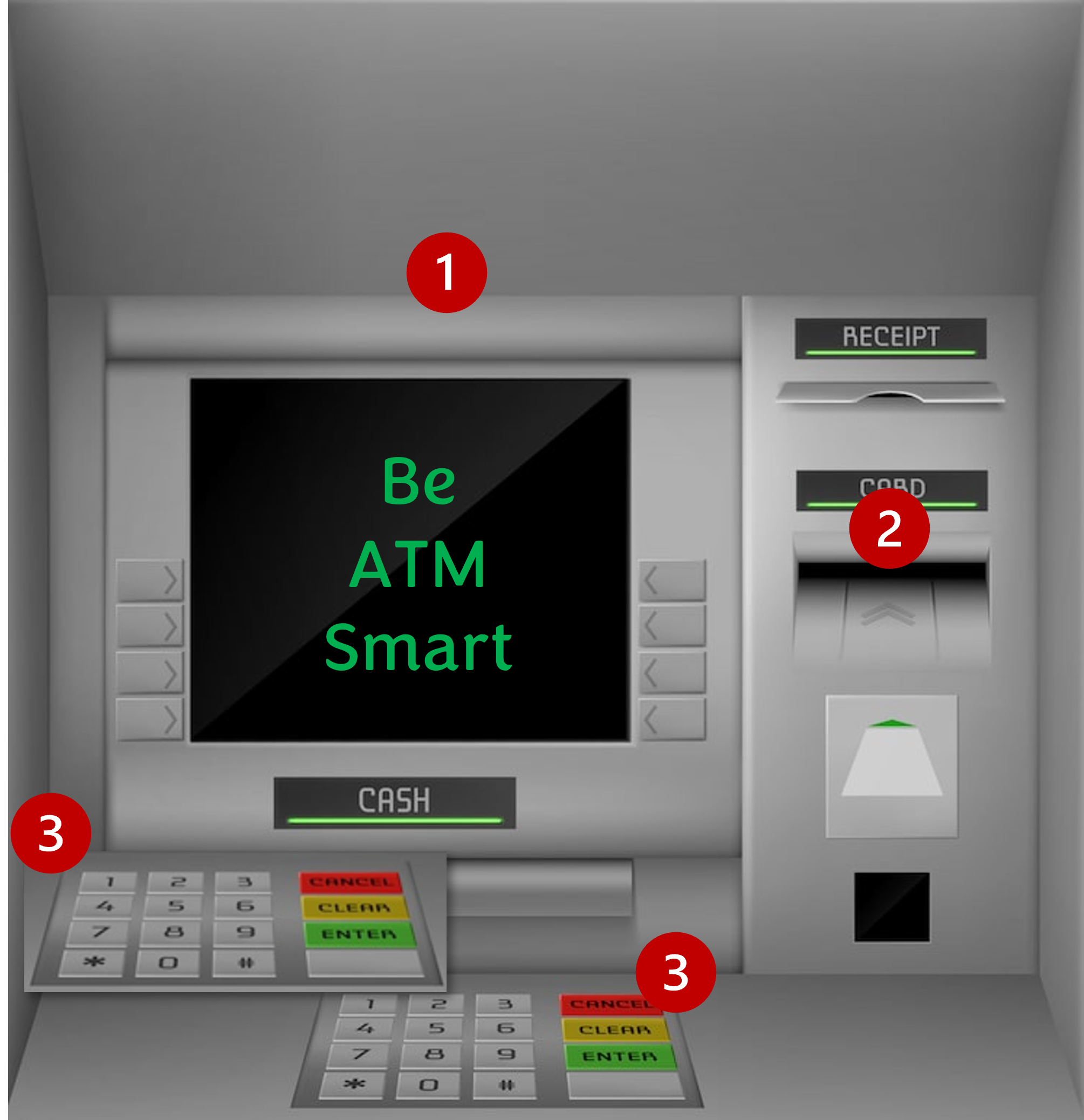
Scam devices have been found on ATMs, Point of Sale (POS) terminals, gasoline pumps – everywhere people use a card to pay. These devices capture personal data and PINs via video, digital download, or wireless transmission to the scammer. For example:
|
- Pinhole cameras are installed to record PIN entries (see image example 1) and are so small they’re hard to detect. Note that pinhole cameras may be placed anywhere on or near the machine.
- Skimmers installed in the terminal or over its reader (see image example 2) steal credit/debit card data from the magnetic stripe or chip.
- Keylogging keypads are overlays that cover the real keyboard, used to record a customer’s keystrokes (see image example 3). If the criminal knows what you type, they know your PIN.
Protecting Your Payment Card
- Inspect ATMs, POS terminals, and other card readers for loose, crooked, damaged, or scratched parts. If you notice something suspicious, use a different terminal.
- Check for keylogging overlays by lifting the edge of the keypad – a gentle tug is all it takes.
- Prevent cameras from recording your PIN by shielding your entry with your hand. Keep in mind that a pinhole camera may be present anywhere on or around the terminal.
- If possible, use ATMs in well-lit, high-traffic locations. Machines are less vulnerable in places where someone might notice a threat actor tampering with them.
- Be especially alert for skimming devices in tourist areas, where card readers are used a lot.
- When possible, use debit and credit cards with chip technology rather than magnetic stripes, which are more vulnerable to theft.
- Avoid using your debit cards for multiple accounts – the compromise of one card gives criminals access to all the accounts. Use a credit card instead.
- Routinely monitor your card accounts to promptly identify any unauthorized transactions. If possible, set up email or text-message alerts to notify you of account transactions.
- Proactively review the account security options. You may be able to set up multifactor authentication or freeze an account between transactions. Such steps may seem inconvenient, but they significantly reduce the risk of financial losses.
- Never give your PIN in response to a call, text, or email. Organizations that have your information would not request your PIN. They use other means to authenticate your account. If you receive a request, look up the source’s website and contact them to check your account.
- Always use a strong PIN. Avoid using PINs that may be easily guessed, such as strings of the same or consecutive numbers (e.g., 11111 or 1234).
- Find out if your account will allow you to temporarily block or freeze transactions on the account.
Tips for Paying at the Pump
- Choose the fuel pump closest to the store and in direct view of the attendant. These pumps are less likely to be targets for skimmers.
- Run your debit card as a credit card. If that’s not an option, cover the keypad when you enter your PIN. You should also examine the keypad before use for any inconsistencies in coloring, material, or shape. These inconsistencies might suggest that a foreign device (keypad overlay) is present.
- Consider paying inside with the attendant, not outside at the pump.
- Tap the card instead of swiping or inserting it when paying at the pump (if the card and terminal allow for it). Tap-to-pay transactions are more secure and less susceptible to compromise.
What to do if You Are Scammed
- Contact your financial institution immediately if the ATM doesn't return your card after you finish or cancel a transaction. It may indicate a foreign device is in the card reader.
- If you suspect your EBT card was compromised, immediately contact your state benefits agency or card issuer. Promptly change your PIN if any funds remain in your account.
|
|
|
|
|
If You’re a Victim?
Immediately change any passwords you might have revealed. Consider reporting the attack to IC3.gov and the police, and file a report with the Federal Trade Commission.
|
|
|
|
Getting Help
If you identify suspicious activity involving your financial institution, contact them immediately.
|
|
|
|
2025-12 When it''s Too Good to be True
|
Dec 2025
When It's Too Good To Be True
|
Monthly Security Tips Newsletter
|
Summary
If it sounds too good to be true, it probably is. This phrase serves as a reminder to be vigilant, especially when considering financial offers or information that appears to lack verifiable proof. It's a call to investigate thoroughly before believing or acting on the offer
|
|
|
To Good To Be True
One of the tools scammers are increasingly using is Artificial Intelligence (AI). AI is being used to create better phishing emails, deepfake, and other impersonation scams. This means consumers need to be additionally cautious when it comes to a gamut of different ploys.
If you are an online shopper, here is a list of common scams that are too good to be true:
Online Dating Scams. If you are a senior citizen, is it realistic for a young man or woman in their early twenties who looks like a high-end model to want to come to the US to be with you, and all you need to do is wire transfer a large sum of money to them?
Going out of Business Scams. Who doesn’t like a good deal on a high-priced item? But those unsolicited emails touting big-discount deals for a limited time may lead to the only thing going out is your money to a scammer.
|
|
Investment Scams. Investment opportunities promoted on professional-looking social media and internet websites, promising quick and guaranteed returns, are a fast way to be taken advantage of. Regardless of a “limited time” crypto project, private fund, or pre-IPO stock offering, set emotions aside and perform your due diligence.
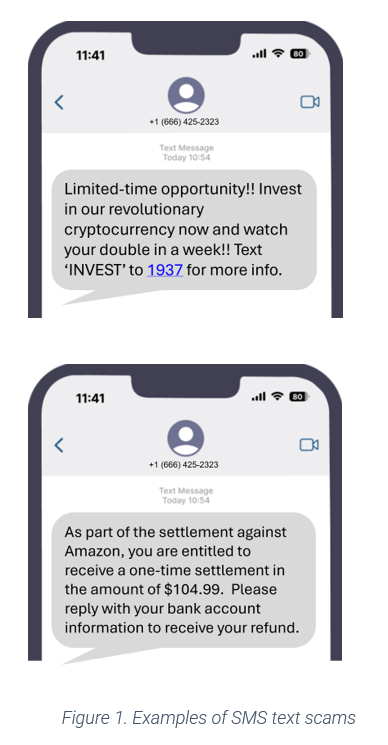
Text Message Deals. The hair on the back of your neck should rise when unsolicited text messages reach your phone, offering super deals on high-end electronics, and so on.
Travel Scams. Looking forward to a getaway during the holiday season? That too-good-to-be-true airfare or cruise trip could wind up giving you the worst holiday experience of all time.
Health Scams. As healthcare costs rise, so do the odds of a scammer's success, especially for those with limited financial resources.
Red Flags
Look for these red flags before you click:
- The offer cannot be traced back to a legitimate source or does not provide contact information other than an email address.
- The firm's domain has misspelled words or an unfamiliar domain, such as .ru, .tk, or .buzz.
- Guaranteed return on your investment with little to no risk.
- Contacted by an unlicensed investment professional
- Sensational or over-the-top pitches that may have fake testimonials
- Pressure to ‘act now’ or you will miss out on the opportunity.
- Request to pay through cryptocurrency or wire transfers to an unverifiable source.
- The requester requests bank account information that a legitimate source would already possess.
- Payment is required up front, and there are no refunds or returns.
- Untraceable or irreversible payment options only are accepted.
- Received an unexpected email or text message offering great deals from a merchant you have no affiliation with.
- The web domain is not that of the store or firm.
- All feedback about the organization is recent and provides five-star positive feedback.
- The offer is listed as free for popular items.
Prevention Tips
- Stop. Think. Ask yourself, "Is this too good to be true?" Then, educate yourself about fraud tactics and how to prevent yourself from becoming a victim.
- Stop. Think. Verify before you click - Use reliable resources to research offers to minimize your risk
- Never click on links from people or firms you do not know, or open files attached to emails.
- Always use a secure connection (https:// and padlock icon) when sharing personal or banking information.
- Never provide your confidential information to businesses that already have that information.
- Always use multi-factor authentication combined with hard-to-guess passphrases.
- Stay up to date with all mobile device and tablet patches, as well as personal computer patches.
- Invest in security solutions to block and protect your mobile devices from phishing and SMS text scams.
Resources
|
|
|
|
|
If You’re a Victim?
Immediately change any passwords you might have revealed. Consider reporting the attack to IC3.gov and the police, and file a report with the Federal Trade Commission.
|
|
|
|
Getting Help
If you identify suspicious activity involving your financial institution, contact them immediately.
|
|
|
|
2025-11 Be on the Lookout for Fraud Scams During the Holiday Season
|
Nov 2025
Be on the Lookout for Fraud Scams During the Holiday Season
|
Monthly Security Tips Newsletter
|
Summary
Each year, people worldwide are visited during the holidays - and not just by jolly St. Nick. Rather, it's fraudsters who take advantage of the seasonal spirit, and they can take the cheer out of your holiday.
|
2024 Fraud Losses
“In 2024, the FBI Internet Crime Complaint Center (IC3) received more than 4,500 complaints representing approximately $96 million in losses from fraudulent charities and disaster relief campaigns.”
FBI, 2025 Disaster Fraud Schemes
“Reported scam losses in the U.S. totaled a record $16.6 billion, according to the FBI's Internet Crime Complaint Center (IC3), a 33% increase from 2023. This figure includes over 859,000 reported internet crimes.”
- CBS News
“One of three Americans have fallen victim to an online scam during the holiday season – and of the 58% of those who’ve lost money to such scams, nearly 1 in 10 lost over $1,000.”
- Yahoo Finance
|
|
Types of Schemes
Fraudsters use the latest technology in a variety of fraud scams that are headed to a community near you. Be wary of solicitations on social media, search engines, text, and email, and keep an eye out for these schemes:
Charity Scams. Scammers invent fake charities or spoof real ones to take advantage of those who want to help the needy during the holidays.
Fake Holiday E-Cards and Party Invitations. Using a twist on the phishing playbook, fraudsters insert links in holiday e-cards and digital invitations that take you to bogus sites, then steal your credentials and/or distribute malware.
Fake Online Retail Stores. Criminals send unsolicited emails containing links to fantastic deals at the website of a retailer you’ve never heard of.
Black Friday and Cyber Monday Scams. The internet blows up with shopping ads for Black Friday and Cyber Monday. Malvertising schemes – i.e., fake ads for real stores – can more easily go undetected when people are expecting promotions.
Fraudulent Gift Cards. Everyone loves the gift cards grandpa gives – in person. Be on the lookout for fraudsters who claim you will receive a gift card by filling out a simple form, which gradually lures you into providing sensitive information.
|
|
Malware QR Codes. Scammers can create QR codes leading you to a malware-laced website to infect your mobile device and computer. Sometimes they print QR codes on stickers that can be placed anywhere, even over legitimate advertisements.
Travel Scams. Fraudsters are using artificial intelligence to clone messages and make deepfake videos to promote fake travel deals, vacation rentals, holiday cruises, and more. These videos and voice messages look real, but won’t send you anywhere you want to go.
Red Flags
Look for these red flags before you click:
- Unsolicited emails and phone calls asking for your confidential information or for information they would already have if they were legitimate.
- A tone of urgency or veiled threats (“you have five minutes to respond,” “the sender’s feelings will be hurt if you ignore the link,” etc.)
- Unfamiliar retailers or websites that have unclear return policies and no contact information other than an email address.
Prevention Tips
Stop. Think. Ask yourself, "Is this too good to be true?" Then, educate yourself about fraud tactics and how to prevent yourself from becoming a victim.
- Check website legitimacy using online tools (e.g., Better Business Bureau, getsafeonline.com, etc.).
- Verify charities independently – search for their website or call their office – before making a donation.
- Check online retailers' URLs carefully for typographical errors and unusual spellings – mistakes signal a spoofed site.
- Never click on a link from an unknown and unverified source.
- Never share your personal information and banking credentials.
- Update security patches as soon as they become available – or have them installed automatically.
- Use multi-factor authentication whenever possible.
- Regularly monitor your financial accounts.
- Forward text messages to SPAM (7726)—then report, block, and delete through your service provider.
Resources
|
|
|
|
|
If You’re a Victim?
Immediately change any passwords you might have revealed. Consider reporting the attack to IC3.gov and the police, and file a report with the Federal Trade Commission.
|
|
|
|
Getting Help
If you identify suspicious activity involving your financial institution, contact them immediately.
|
|
|
|
2025-10 When A Scam Follows a Natural Disaster
|
Oct 2025
When a Scam Follows a Natural Disaster
|
Monthly Security Tips Newsletter
|
When A Scam Follows a Natural Disaster
Summary
When natural disasters occur, fraudsters are often close behind. Their goal: exploit victims' financial and emotional vulnerability to steal money or personal information.
|
Disaster-Related Fraud Schemes
“In 2024, the FBI Internet Crime Complaint Center (IC3) received more than 4,500 complaints representing approximately $96 million in losses from fraudulent charities and disaster relief campaigns.”
FBI, 2025 Disaster Fraud Schemes
|
|
Types of Schemes
Three different kinds of schemes are typical after a disaster: fraudulent disaster relief charities, post-disaster insurance offers, and repair work.
Charity scams appeal to people’s kindness with solicitations – conducted by phone, text, or email – purporting to help victims of a natural disaster.
Post-disaster insurance scams target those victims directly with offers of help – such as “government-provided” temporary housing – for a fee or security deposit on the space.
|
|
Red Flags
Consumers should know that representatives of the government (FEMA) do not solicit donations through emails, texts, or phone calls. Government disaster agencies will never call or text to ask for your financial information, and charge no fee to apply for assistance.
Additionally, though time is of the essence after a disaster, scammers manipulate victims by instilling a sense of urgency. Be aware of that technique and remember that your money is better spent if you take the time to verify the recipient’s honesty.
Resources – Education and Reporting
The federal government, states, commonwealths, territories, and the District of Columbia all have laws designed to protect older adults from elder abuse and guide the practice of adult protective services agencies, law enforcement agencies, and others. These laws vary considerably from state to state.
If you believe a vulnerable adult is being abused, the following organizations can help:
Please remember to notify the vulnerable adult’s financial institution so it can protect their assets and investigate the matter.
Prevention Tips
- Donate to charities you know and trust with a proven track record of dealing with disasters. And watch out for name impersonation scams, in which fraudsters use names and logos similar to those of reputable charities. Look twice before you engage, even if the charity seems familiar.
- Before you give, research the charity yourself — especially if the donation request comes on social media. Check out the charity on the Better Business Bureau’s Give.org, or Charity Watch. Find out exactly how much of your donation will go directly to the people the charity says it helps.
- Don’t donate to anyone who insists you must pay by cash, gift card, money wire, or cryptocurrency. Legitimate organizations accept ordinary forms of payment. If you decide to donate, write a check directly to the charity, not an individual, or pay by credit card – it will give you more protection.
- Be cautious about crowdfunding sites. Know that money raised in a crowdfunding campaign goes to the campaign organizer, not directly to the people or cause it’s set up to help. Review the crowdfunding platform’s policies to be sure it verifies posts aren’t scams. And remember, donations to crowdfunded sites aren’t tax-deductible.
- Confirm the number before you donate. Phone scams often use spoofing techniques to make the information transmitted to your caller ID display appear official. If someone asks you to donate on the phone or via text, call the number on the charity’s website to confirm the donation method.
- Verify that your contractors are legitimate. Contact your insurance company before hiring anyone, and make sure the company you hire is licensed and bonded.
- Practice good cyber hygiene. Most legitimate charity websites end in “.org” rather than “.com” or other extensions. The website https://outreach.fsisac.com/e/1041561/2025-10-03/3swsy/1616724541/h/ncg4WxLTJZSYTmB1gOtyyGUQAGh3b7DWoTz8tg6P-vQ lists common fraud top-level domains (TLD) and ic3.gov-PSA has current information about common scam tactics. Additionally, never click on links or open attachments in unsolicited emails, texts, or social media posts. They can contain malware.
Resources
Learn more about how to donate safely with resources provided by the Federal Trade Commission at ftc.gov/charity. For advice to help you prepare for, deal with, and recover from weather emergencies and the scams that follow, check out ftc.gov/weatheremergencies.
|
|
|
|
|
If You’re a Victim?
Immediately change any passwords you might have revealed. Consider reporting the attack to IC3.gov and the police, and file a report with the Federal Trade Commission.
|
|
|
|
Getting Help
If you identify suspicious activity involving your financial institution, contact them immediately.
|
|
|
|
2025-09 Baseline Recommendations for the Cloud
|
Sept 2025
Baseline Recommendations for the Cloud
|
Monthly Security Tips Newsletter
|
Summary
If you have a personal computer, mobile phone, or tablet, you’re probably storing data. According to industry sources, people use an average of 20 gigabytes (GB) of data on their devices and store 500GB on a personal cloud. Considering that a photo is about five megabytes (MB) – one GB is equal to 1024 MB – you likely have a lot of bytes in the form of images, videos, documents, and music stored in the cloud. And you probably want to keep every byte safe, especially the ones storing your financial information.
|
Average Consumer Data Consumption
- “The average person uses about 20GB of data per month.” (Mint Mobile)
- “On average each photo requires 5MB of storage.” (Samsung)
- “The average person stores about 500 GB of data in personal cloud storage.” (pCloud)
|
|
Securing Data in the Cloud
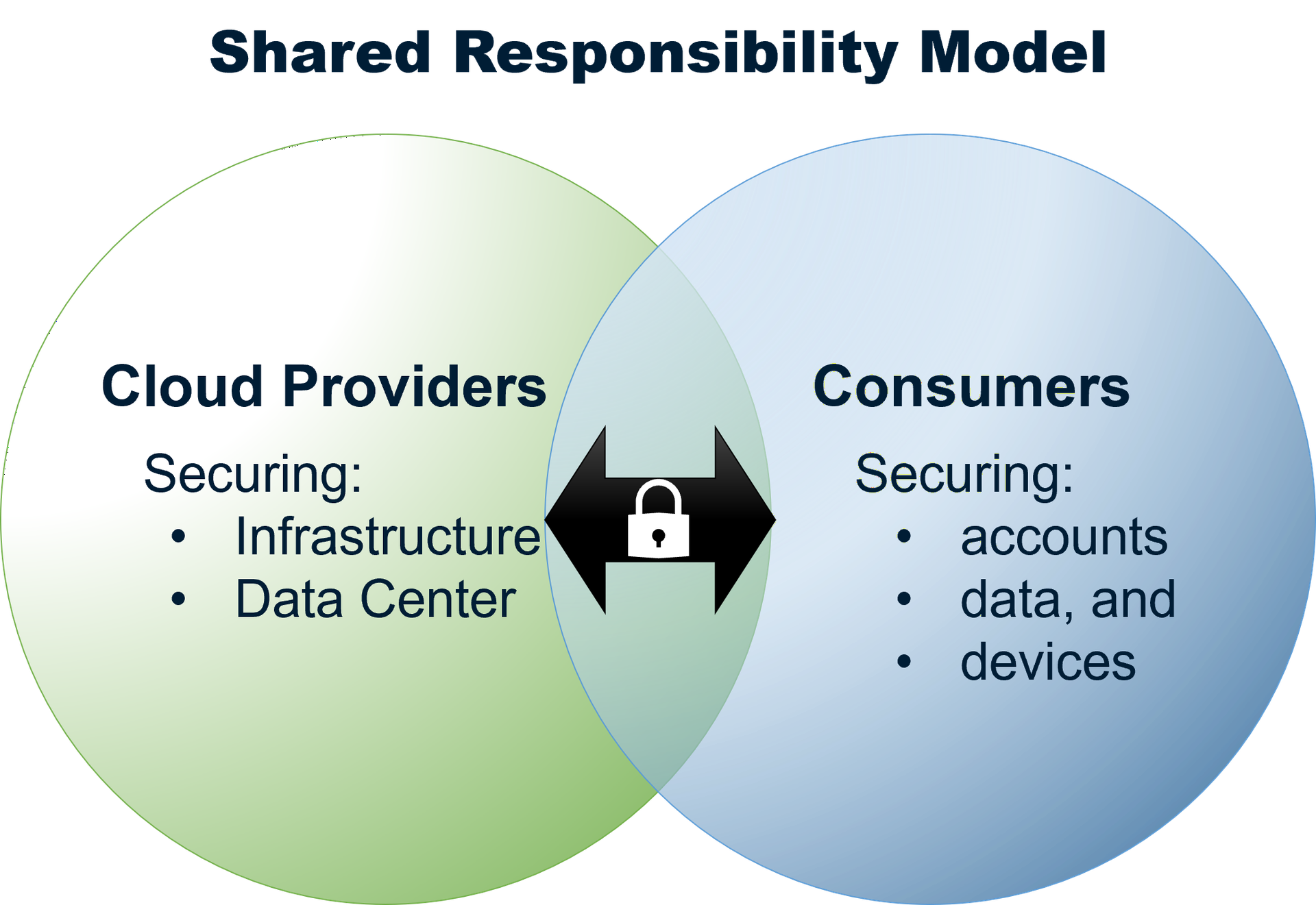
To secure the data you store, most cloud providers operate on a shared responsibility model. This is how it works: your cloud service provider handles security threats related to the cloud and its infrastructure while you watch out for your data and other assets stored in the cloud. This model ensures that your stored data can withstand a cyber incident and that you can access your data if any of your backed-up devices are irretrievably damaged.
|
|
|
To hold up your end of the shared responsibility model, follow these baseline standards.
First, use a combination of strong, unique passwords and enable MFA for all cloud accounts to prevent unauthorized access.
Second, use antivirus and other security software to protect your devices. Avoid unsecured WiFi networks.
Third, take the time to understand and use encryption so hackers can’t access it in the event of a breach.
Fourth, regularly inspect and back up your data to the cloud, and make sure you can view and/or access it.
Fifth, review the access capabilities you’ve established that let others view your data and update it to reflect lifestyle changes (e.g., marriage).
Sixth, pay attention to current events and notifications from your provider about security incidents. Stay informed about cloud security recommendations.
|
Does That Data Need to Be in the Cloud?
Finally, not everything needs to be stored in the cloud. As it relates to financial data in particular, prioritize information by determining its value, the damage caused if it were lost, and how long it would take you to recover it, e.g., contacting your financial institution, closing/opening new accounts, financial loss, credit bureau restoration, etc.
|
|
|
|
|
|
If You’re a Victim?
Immediately change any passwords you might have revealed. Consider reporting the attack to IC3.gov and the police, and file a report with the Federal Trade Commission.
|
|
|
|
Getting Help
If you identify suspicious activity involving your financial institution, contact them immediately.
|
|
|
|
2025-08 Protecting Your Personal Information
|
Aug 2025
Protecting Your Personal Information
|
Monthly Security Tips Newsletter
|
Summary
When it comes to protecting your identity, you may be thinking about keeping usernames to yourself, using strong passwords, and the like.
What if you receive paper statements or digital files? It's important to think about any document that contains your personal and financial information, but how do you determine what you should keep and lock up, and what you should shred or delete?
|
Key Facts:
-
There are four timeframes you should consider for retention, ranging from 1 year to forever, while there are documents you should shred monthly.
-
Not all document shredders are the same; there are 7 types; 4 and higher provide greater security.
-
When considering the purchase of a document shredder, P4 and higher provide the best results.
|
|
Those credentials can be used to obtain more information about the victims with the goal of accessing their banking accounts.
With so many entities in possession of your credentials, password security is something that you need to manage – but how? By arming yourself with knowledge and make your passwords hard to hack.
The BIG Four
Four types cover specified or indefinite timeframes, and here they are:
Keep for a Year
If you can access these documents electronically, why not go paperless and consider shredding paper copies?
Keep for at Least Three years
-
Income tax returns
-
Tax-related documents, like canceled checks, receipts, W-2s, and 1099s
-
Records related to selling a home
-
In some cases, the IRS recommends keeping tax returns and tax-related documents for longer than three years. If you can access these documents electronically, consider shredding your paper copies.
Keep While You Own
-
The title to your vehicle
-
The title or deed to your home
-
Documents related to mortgage or vehicle loans
-
Home improvement receipts
-
Rental agreements and leases
-
Sales receipts and warranty information for major appliances
Keep Forever
-
And lock up, consider obtaining a safe and fire-resistant document pouch(es):
-
Birth certificate or adoption papers
-
Social Security cards
-
Valid passports and citizenship or residency papers
-
Marriage licenses and divorce decrees
-
Military records
-
Wills, living wills, powers of attorney, and retirement and pension plans
-
Death certificates of family members
-
Vital health records (especially those that predate electronic health records)
Things That go Shred
-
ATM receipts
-
Offers of credit or insurance
-
Cleared checks (after 14 days)
-
Credit reports
-
Prescription information for medicines you no longer take
-
Expired warranties
-
Expired credit cards, driver’s licenses, and other forms of identification
When it’s time to dispose of documents with your personal or financial information, shred them. If you don’t have a shredder, look for a local shred day in your community.
If you handle paper documents containing bank statements, social security numbers, and any other similar personal data, you need a shredder with a P-4 rating or above. If you're looking for a high level of security, consider a P-5 Micro Cut shredder.
Please remember to secure paper documents before shredding, so in the event of a burglary, you will have one less task to handle with law enforcement and your financial institutions.
| Shred regular bills and other documents containing personal information, such as: |
|
|
-
Prescription information for medicines you no longer take
-
Expired warranties
-
Expired credit cards, driver’s licenses, and other identification documents
|
|
|
|
|
|
|
If You’re a Victim?
Immediately change any passwords you might have revealed. Consider reporting the attack to IC3.gov and the police, and file a report with the Federal Trade Commission.
|
|
|
|
Getting Help
If you identify suspicious activity involving your financial institution, contact them immediately.
|
|
|
|
2025-07 Its Time to Discuss Passwords
|
Jul 2025
It's Time to Discuss Passwords
|
Monthly Security Tips Newsletter
|
Summary
Who owns the security of your information?
The answer is that security is everyone’s responsibility – including you and the businesses that secure your email address online or physically. That may be a big group. Think about how often you log into a website using your credentials. Now, think about how often you reuse the same password.
Odds are, hackers are thinking about it. Between April 2024 and April 2025, in the US alone, security breaches gave threat actors access to 184 million consumer passwords, according to a recent Yahoo Moneywise article.
The cybercriminals obtained email addresses, passwords, and login links “tied to major platforms like Apple, Google, Facebook, Microsoft, and even government and financial services,” according to the article.
|
|
|
|
Key Facts:
- The Identity Theft Resource Center (ITRC) Annual Data Breach Report recorded 3,205 cyber attacks (8.7 per day) leading to data compromises in 2024.
- 90% of dark web “access for sale” listings feature stolen logins, and 60% of Americans reuse passwords. More than four million people use 123456 as a password. (Spacelift)
- According to security researcher, Troy Hunt, 14,983,511,979 passwords and 888 websites have been identified as compromised.
- Has your email address and/or password been compromised? Find Out Now.
|
|
|
|
Those credentials can be used to obtain more information about the victims with the goal of accessing their banking accounts.
With so many entities in possession of your credentials, password security is something that you need to manage – but how? By arming yourself with knowledge and make your passwords hard to hack.
Baseline Security Tips
Start your security protocol by checking to see if your email address and/or password have been compromised by using this free tool. This tool even tells you which breach is associated with your stolen passwords. Additionally, you can register to be notified when credentials have been compromised.
If you discover you need to change passwords – or want to take better ownership of your security – use these tips.
- The National Institute of Standards and Technology (NIST) recommends passwords of at least 12-16 characters. Some organizations, such as the Cybersecurity and Infrastructure Security Agency (CISA), recommend even longer passwords. At a minimum, passwords should be:
- Long—at least 16 characters long (even longer is better).
- Random—use a string of mixed-case letters, numbers, and symbols (the strongest!) or a passphrase of 4 –7 random words.
- Unique—used for one and only one account.
- Use Multi-Factor Authentication wherever possible – especially when accessing websites linked to financial records.
- Frequently change your passwords using the above criteria.
- Never click on links or attachments in emails.
Common Email Themes
Speaking of emails, be aware of the techniques scammers commonly use in emails:
- Urgent messages
- Generic greetings
- Suspicious claims
- Unrealistic promises
- Threatening language
|
|
|
- Typos and grammatical errors
- Suspicious links
- Unsolicited attachments
- Requests for personal information:
- Impersonation of a legitimate organization
|
|
|
|
|
|
|
|
|
|
|
|
|
If You’re a Victim?
Immediately change any passwords you might have revealed. Consider reporting the attack to IC3.gov and the police, and file a report with the Federal Trade Commission.
|
|
|
|
Getting Help
If you identify suspicious activity involving your financial institution, contact them immediately.
|
|
|
|
2025-06 Vulnerable Adult Safety
|
Jun 2025
Vulnerable Adult Safety
|
Monthly Security Tips Newsletter
|
Summary
In her book, The Good Earth, American writer Pearl Buck wrote, “Our society must make it right and possible for old people not to fear the young or be deserted by them, for the test of a civilization is the way that it cares for its helpless members.”
The abuse of vulnerable adults can be emotional, physical, or financial and one type of abuse, financial fraud, is surging. Common fraud schemes include:
- Social engineering scams that fraudsters use to steal money and personal information
- Predatory lending scams that trap victims in debt
- Investment schemes, such as pyramid frauds, that demand an input of cash and promise unrealistically large returns
- Identity theft scams that make victims responsible for fraudulent credit cards debt
- Medicare scams that demand personal information to verify or activate a new Medicare card
Financial institutions train their employees to be aware of financial abuse; however, there are signs and actions you can take to protect your loved ones.
|
|
|
|
Key Facts:
- Around one in six people aged 60 years and older experienced some form of abuse in community settings during the past year.
- The global population of people aged 60 years and older will be 2 billion in 2050.
World Health Organization
- Scams targeting individuals aged 60 and older caused over $3.4 billion in losses in 2023 — an increase of approximately 11% from the year prior.
- The average victim of elder fraud lost $33,915 due to these crimes in 2023.
FBI
- One in nine seniors reported being abused, neglected, or exploited in the past 12 months.
- One in 20 older adults indicated some form of perceived financial mistreatment occurring in the recent past.
National Adult Protection Services
|
|
|
|
Signs of Scams by Strangers
|
Signs of Scams by Care Givers
|
|
Notification of a lottery or sweepstakes prize for someone who didn’t enter the contest
|
Inappropriate power of attorney request for oversight of financial and physical assets
|
|
Unsolicited offer to do home repair such as inspections, roofing, driveway repair, etc.
|
Addition of co-signers to a bank account, used primarily by the co-signer
|
|
Message that a family member has been in an accident or is in jail and urgently needs funds
|
Unauthorized use of ATM cards to withdraw funds from the victim’s account
|
|
Solicitation of money for a non-existent charity
|
Threats of or actual physical and mental abuse to obtain money
|
|
Intimidating telemarketing call demanding money, gift cards, or bank account numbers
|
Exploitation of vulnerabilities by in-home care providers — i.e., demands for money to perform tasks, falsified timesheets, failure to perform duties, theft
|
|
Wire transfer fund request
|
|
|
|
|
Resources – Education and Reporting
The federal government, states, commonwealths, territories, and the District of Columbia all have laws designed to protect older adults from elder abuse and guide the practice of adult protective services agencies, law enforcement agencies, and others. These laws vary considerably from state to state.
If you believe a vulnerable adult is being abused, the following organizations can help:
Please remember to notify the vulnerable adult’s financial institution so it can protect their assets and investigate the matter.
|
|
|
|
|
|
|
If You’re a Victim?
Immediately change any passwords you might have revealed. Consider reporting the attack to IC3.gov and the police, and file a report with the Federal Trade Commission.
|
|
|
|
Getting Help
If you identify suspicious activity involving your financial institution, contact them immediately.
|
|
|
|
2025-05 Is This Text Real or a Scam?
|
May 2025
Is This Text Real or a Trap?
|
Monthly Security Tips Newsletter
|
Summary
If you and your children have a mobile phone, you’ve probably received texts from friends and family. If you’ve opted in to receive texts from retailers, you get these too. But what do you do when you receive a text, and you question the source?
The answer matters because your response to a questionable text might keep you safe from a scammer — or lead you into a trap.
Text Message Scams on the Rise
New data from the Federal Trade Commission (FTC) shows that in 2024, “consumers reported losing $470 million to scams that started with text messages. This amount is five times higher than what was reported in 2020, even though the number of reports declined.”
How Text Scams Work
Below is a simplistic example of how a spoofed message can be sent to you.
Step One. Threat actors obtain your phone number on the Dark Web or generate your number with an auto-dialer tool.
Step Two. The scammer creates a message. Many scam texts sound urgent to get victims to react without thinking — “invoice overdue” or “your account has been breached” are common ruses.
Step Three. The scammer sends the text and hopes you bite.
Prevention Tips
- Don’t reply to unexpected text messages. The text may push you to react quickly, but it’s best to stop and think it through.
- Never click links in unexpected messages. You might download malicious software (malware) that will compromise your device, and scammers often create real-looking websites to draw you deeper into the trap.
- Don’t assume a text from a known company or organization is legit. Double check by contacting the company. Don’t use information from the text — get a phone number or email address from the company’s website.
Filtering Unwanted Texts
There are many ways to filter unwanted text messages or stop them before they reach you.
- On your phone - Your phone may have an option to filter and block spam or messages from unknown senders. Here’s how to filter and block messages on an iPhone and how to block a phone number on an Android phone.
- Through your wireless provider - Your wireless provider might have a tool or service that lets you block calls and text messages. Check out ctia.org, a website from the wireless industry, to learn about options from different providers.
- With a call-blocking app - Go to ctia.org for a list of call-blocking apps for Android, BlackBerry, Apple, and Windows phones, or search for an app online. Check out the features, user ratings, and expert reviews.
Take Action – Report Texts
• Forward spam messages to 7726 (SPAM). This helps your wireless provider spot and block similar messages.
• Report potential scams on either the Apple iMessages app or Google Messages app for Android users.
• Report potential scams to the FTC at ReportFraud.ftc.gov.
If you’ve lost money to a scam, reach out to the company that transferred the money right away to see if there’s a way to get your money back. Then report the scammer at ReportFraud.ftc.gov.
|
|
|
|
If You’re a Victim?
Immediately change any passwords you might have revealed. Consider reporting the attack to IC3.gov and the police, and file a report with the Federal Trade Commission.
|
|
|
|
Getting Help
If you identify suspicious activity involving your financial institution, contact them immediately.
|
|
|
|
2025-04 Signs of a Scam
|
Apr 2025
Signs of a Scam
|
Monthly Security Tips Newsletter
|
Summary
Scammers tell all kinds of stories to try to steal your money or information. They may pretend to be a government official saying you owe a fine. Or they may pose as a friend or online love interest who supposedly needs information or money. A scammer might offer you a (fake) job but say you need to pay a fee before you get hired.
Yet though the lies differ, scammers often use the following five tactics:
- Contacting you unexpectedly. They’re hoping the element of surprise causes you to drop your guard. Don’t respond to unexpected calls, emails, texts, or social media messages that request money or personal information. If you’re not sure if a call or message is real, look up contact information from a different source and reach out to the business, organization, or person — even if they’re claiming to be a friend or relative.
- Telling you to hurry. Scammers don’t want you to have time to think or check out their story. So slow down and think it over. Talk to someone you trust before providing money or information.
- Telling you to pay — and HOW to pay. Scammers want you to pay in ways that are hard to track. Don’t pay anyone who contacts you out of the blue and insists you can only pay with cash, a gift card, a wire transfer, cryptocurrency, or a payment app. Those methods make it hard to get your money back, if it’s possible at all.
- Pretending to be from an organization you know. To earn your trust, scammers often pretend to be contacting you on behalf of a government agency, like the FTC, Social Security Administration, IRS, or Medicare (some even make up a name that sounds official). They may pretend to be from a business you know, like a utility company, a tech company, or even a charity asking for donations. They often use technology to change the phone number that appears on your caller ID so the name and number you see is convincing — even though it’s not real. Don’t pay them until you’ve checked the source independently, just like you would for any unexpected contact, and see how the organization actually reaches out to people. Many, like the IRS, never call people and ask for payment.
- Saying there’s a problem or a prize. It’s a tactic to hook you emotionally.They might say you’re in trouble with the government or you owe money. Or someone in your family had an emergency. Or that there’s a virus on your computer. Some scammers say there’s a problem with one of your accounts and that you need to verify some information. Others will lie and say you won money in a lottery or sweepstakes but have to pay a fee to get it. Don’t.
|
|
|
It's Easier to Prevent than Recoup
|
|
|
Knowing the signs of a scam helps you see through the stories that scammers tell. Meanwhile, protect yourself from fraud with these defenses:
Block unwanted calls and text messages. The best way to protect yourself from scam calls and texts is not to get them.The easiest way? Block unwanted calls and filter unwanted text messages.
Don’t give your personal or financial information to someone you didn’t expect to ask for them. Organizations that care about your security don’t ask you to report your social security, bank account, or credit card numbers in unsafe ways, like on the phone or via text. Even if you think an email or text message is from a legitimate source, it’s still best not to click on any links. Instead, contact the organization using a website you know is trustworthy. Or look up their phone number. Don’t call a number they gave you or the number from your caller ID.
Resist the pressure to act immediately. Most businesses will give you time to make a payment. People who pressure you for money or your personal information probably do not have your best interests in mind.
Know how scammers want you to pay. Never pay someone who insists that you can only pay with cryptocurrency, a wire transfer service like Western Union or MoneyGram, a payment app, or a gift card. And never deposit a stranger’s check and send the money on to someone else — when the check bounces, you’re stuck with the loss.
Stop and talk to someone you trust. Before you do anything else, tell someone — a friend, a family member, a neighbor — what happened. Talking about it could help you think the situation through.
If you’ve lost money to a scam, reach out to the company that transferred the money right away to see if there’s a way to get your money back. Then report the scammer at ReportFraud.ftc.gov.
|
|
|
|
If You’re a Victim?
Immediately change any passwords you might have revealed. Consider reporting the attack to IC3.gov and the police, and file a report with the Federal Trade Commission.
|
|
|
|
Getting Help
If you identify suspicious activity involving your financial institution, contact them immediately.
|
|
|
|
2025-03 Tis the Tax Fraud Season
|
Mar 2025
‘Tis the Tax Fraud Season
|
Monthly Security Tips Newsletter
|
|
Summary
It’s that time of year again and the possibility of phishing scams takes the usual tax-time anxiety to a whole new level as the Internal Revenue Service warns that fraudulent tax professionals are behind tax-related identity theft and financial harm.
These phishing and related scams are designed to trick the recipient into disclosing personal information such as passwords and bank account, credit card, and Social Security numbers, or into sending gift cards or wire transfers to the scammer.
US consumers and business owners should be extra vigilant, know the different phishing terms, and be aware of what the scams might look like:
Phishing/smishing – Phishing (emails) and smishing (SMS/texts) attempt to trick the recipient into providing sensitive information or downloading malware — i.e., malicious software — by clicking a link. Phishing emails are often sent to multiple email addresses at an organization to increase the chance someone will fall for the trick.
Spear phishing – This email phishing scam is more specific in that it targets potential victims individually and delivers a more effective email known as a "lure." These types of scams can be harder to identify because they are personalized, which makes the email seem more legitimate.
Whaling – Whaling attacks generally target leaders or other executives with access to large amounts of sensitive information at an organization or business. Whaling attacks can also target human resources or accounting office personnel.
|
|
|
|
|
Fraudsters use a wide array of different themes in their campaigns, which often look like ordinary business communications. Train your personnel to spot these attempts and prevent the disclosure of credentials or other financial and business assets.
|
|
|
|
Cloud-Based Schemes Aimed at Tax Preparers
|
|
|
The IRS and tax preparers continue to see attacks that exploit cloud-based applications.
-
These cloud-related schemes trick their victims with realistic-looking phishing emails that contain links to websites that mimic cloud storage sites that look legitimate but are frauds. These scams are designed to collect the tax preparer's credentials, which the threat actor uses to access the real cloud storage site.
-
Tax professionals using cloud-based applications are warned to use multi-factor authentication with information storage or run tax preparation software to help safeguard data. Multi-factor authentication requires at least two forms of identity, such as a password and a fingerprint, providing an extra layer of security.
|
|
|
Red Flags for Choosing a Tax Professional
|
|
|
“Ghost” preparers - The IRS requires that paid tax preparers sign returns. Unscrupulous “ghost” preparers, however, have the taxpayer sign and send the IRS their tax returns. These scammers often promise large refunds or charge low fees based on the refund amount. These red flags of unethical behavior can indicate fraud.
Valid ID for tax preparers - Taxpayers should always choose a tax preparer with a valid Preparer Tax Identification Number (PTIN). By law, anyone who is paid to prepare or assists in preparing federal tax returns must have a valid PTIN. Paid preparers must sign and include their PTIN on any tax return they prepare.
|
|
|
Safe Tax Preparers for Employers
|
|
|
Employers need to understand their payroll and employment tax responsibilities and choose a trustworthy tax prep service. Here are a couple of options:
- A certified professional employer organization (CPEO). Typically, these organizations are solely liable for paying the customer's employment taxes, filing returns, and making deposits and payments for the taxes reported related to wages and other compensation. They file employment tax returns and deposits and pay the combined tax liabilities of their customers using the CPEO's Employer Identification number. An employer enters into a service contract with a CPEO and then the CPEO submits Form 8973, Certified Professional Employer Organization/Customer Reporting Agreement to the IRS. Employers can find a CPEO on the Public Listings page of IRS.gov.
- Reporting agent. This is a payroll service provider that informs the IRS of its relationship with a client using Form 8655, Reporting Agent Authorization, which is signed by the client. Reporting agents must deposit a client's taxes using the Electronic Federal Tax Payment System and can exchange information with the IRS on behalf of a client, such as to resolve an issue. They are also required to provide clients with a written statement reminding the employer that it, not the reporting agent, is ultimately responsible for the timely filing of returns and payment of taxes.
|
|
|
Reporting an IRS Impersonator
|
|
|
The IRS doesn’t initiate contact by email, text, phone, or social media to request personal or financial information, and you can verify a suspicious message with the IRS. If you think it’s a scam, report it.
If your Social Security number (SSN) or individual tax identification number (ITIN) was stolen, immediately report it to IdentityTheft.gov.
|
|
|
|
|
|
|
If You’re a Victim?
Immediately change any passwords you might have revealed. Consider reporting the attack to IC3.gov and the police, and file a report with the Federal Trade Commission.
|
|
|
|
Getting Help
If you identify suspicious activity involving your institution, contact them immediately.
|
|
|
|
| |
©FS-ISAC 2025
2025-02 Love is in the Air, or is it?
|
Feb 2025
Love is in the Air, or is it?
|
Monthly Security Tips Newsletter
|
|
Summary
February 14th is right around the corner and love is in the air. Are you confident that the person special person you are talking to via the Internet is who they say they are?
A romance scam is a type of confidence ruse where a criminal pretends to be romantically interested in a victim to gain their trust and steal money. Scammers may use dating sites and social media to target victims.
According to Yale Cybersecurity, “The average loss from a romance scam was $4400 in 2022. Nearly 70,000 people reported a romance scam to the Federal Trade Commission (FTC), with total reported losses of an astounding $1.3 billion.”
|
|
| Why Should You Be Worried? |
|
|
Scam artists play on emotion. They may email photos to create a bond with the victim. Once that emotional bond is cemented, they often say they all they need is to be wire transferred funds and when received, will travel to meet them.
There are other scenarios where a person arrives at the persons home with “family members” who then physically and emotionally abuse the victim.
Whatever the case, it begins with that first wire transfer which makes it easier to avoid meeting in person - and more plausible when they ask for money for a medical emergency, an unexpected legal fee, or some over emergency.
If someone you meet online needs your bank account information to deposit money, they are most likely using your account to carry out other theft and fraud schemes.
|
|
|
|
|
Regardless of whether you are the victim or care for a family member, the Federal Bureau of Investigation wants you to think and talk with a trusted friend or family member:
- Be careful what you post and make public online. Scammers can use details shared on social media and dating sites to better understand and target you.
- Research the person’s photo and profile using online searches to see if the image, name, or details have been used elsewhere.
- Go slowly and ask lots of questions.
- Beware if the individual seems too perfect or quickly asks you to leave a dating service or social media site to communicate directly.
- Beware if the individual attempts to isolate you from friends and family or requests inappropriate photos or financial information that could later be used to extort you.
- Beware if the individual promises to meet in person but then always comes up with an excuse why he or she can’t. If you haven’t met the person after a few months, for whatever reason, you have good reason to be suspicious.
- Never send money to anyone you have only communicated with online or by phone.
- If your financial institution has investigated the matter and tell you it’s a scam – believe them, they are looking out for your best interests.
Lots of people have found love online — but many have found crooks and criminals too. So, during this special time of year when love is in the air, remember to be careful with your heart and your wallet.
|
|
| What to Do if You are Scammed |
|
- If you feel an email contains a scam, don’t respond. Block the sender.
- If it’s a phone call – hang up!
- Set emotion aside, if it’s too good to be true, it usually is.
- If you provide your personal information (account, date of birth, online banking user ID, password, etc.) contact your financial institution immediately.
- Verify then trust the source.
|
|
|
|
|
|
|
|
|
If You’re a Victim?
Immediately change any passwords you might have revealed. Consider reporting the attack to IC3.gov and the police, and file a report with the Federal Trade Commission.
|
|
|
|
Getting Help
If you identify suspicious activity involving your institution, contact them immediately.
|
|
|
|
| |
©FS-ISAC 2025
Identifying and Preventing Elder Abuse
- What is Elder Abuse?
Elder abuse is a willful act or a failure to act that creates or causes a risk of harm to an older adult. An older adult is considered to be someone age 60 or older. The abuse occurs at the hands of a family member, a caregiver, or a person the elder trusts. Common types of elder abuse include:
- Physical abuse occurs when an elderly person encounters illness, pain, injury, functional impairment, distress, or death as a result of the willful use of physical force and may include actions such as kicking, hitting, pushing, slapping, or burning.
- Sexual abuse is the unwanted or forced sexual interaction of any kind with an older adult. This could include unwanted sexual contact or non-contact actions such as sexual harassment.
- Psychological or Emotional abuse refers to verbal or nonverbal behaviors that inflict anguish, mental pain, fear, or distress on an older adult. Examples may include humiliation and/or disrespect, verbal and non-verbal threats, harassment, and isolation (geographic or interpersonal).
- Neglect is a failure to meet an older adult’s basic needs. These needs may include food, water, clothing, shelter, hygiene, and essential medical care.
- Financial Abuse is the unauthorized, improper, or illegal use of an older adult’s money, assets, benefits, property, or belongings for the explicit benefit of someone other than
the elderly adult. Common financial abuse scenarios include:
- Misappropriation of income or assets
- Improper or fraudulent use of the power of attorney or fiduciary authority
- Obtain money or property by undue influence
- Scams
- How big is the problem?
Elder abuse is a serious problem in the United States. The number of cases is underestimated as the number of nonfatal injuries is limited to older adults who
are treated in emergency departments. The information doesn’t include those treated by other providers or those that do not need or do not seek treatment. Additionally, because elders are afraid or
unable to tell police, friends, or family about the violence, many cases aren't reported. Victims need to decide whether to tell someone they are being hurt or continue to be abused by someone they depend upon
or care for deeply.
Elder abuse is common. Approximately 1 in 10 people aged 60 and over who live at home experienced abuse, including exploitation and neglect. In the years 2002 through 2016,
more than 643,000 older adults were treated in the emergency department for nonfatal assaults and over 19,000 homicides occurred.
Financial abuse is hard-to-detect and is becoming a widespread issue. Financial neglect occurs when an older adult’s financial responsibilities such as paying rent or mortgage, medical expenses or
insurance, utility bills, or property taxes, are ignored, and the person’s bills are not paid. Even strangers can steal financial information using the telephone, internet, or email. Be careful about sharing any financial information
over the phone or online.
- How can elder abuse be prevented?
There are many factors that may increase or decrease the risk of inflicting and/or experiencing elder abuse. To prevent elder abuse, we must observe and correct the factors that put people at risk for or protect them from violence.
- Observe signs of insufficient care or unpaid bills despite adequate financial resources.
- Learn how signs of elder abuse are different from the normal aging process.
- Listen to older adults and their caregivers to understand challenges and provide support.
- Learn how to recognize and report elder abuse
- Provide stressed caregivers with support from family and friends, day care programs, and counseling.
- How can you avoid becoming a victim of financial abuse?
- Use direct deposit for all checks. Sign your own checks and do not sign a "blank check" for anyone.
- Have a trusted third person review your bank statement if someone helps you manage your finances. Put all financial instructions in writing and be specific.
- Establish a banking relationship with the staff at your bank.
- Execute a power of attorney with a trusted friend, relative, or attorney. The definition of this may be as limited or as broad as you wish.
- Do not sign over money or property to anyone in return for care, including family and friends.
- Keep all important documents together. This includes wills/trusts, insurance policies, and bank account information. Be sure to let someone know where these documents are kept.
- Never give out credit card numbers over the phone unless you placed the call. Never give out your Social Security Number or bank account number over the phone.
- If something seems "to good to be true," it is probably a scam. This includes being told you won a prize for a drawing you did not enter or that someone will get you 100 percent return on an investment.
- How can elder abuse be reported?
To report elder abuse and to learn more, please follow the links below.


 Security Basics
 Online Security
 Computer Safety
 Business Protection
 Identity Theft
 Privacy Policy
 Cyber Tips Newsletters
 Elder Abuse